A LITTLE PLANNING
Make room for a good day.
Start with guest rules, not the tables
Most couples build a seating chart the same way: draw the tables, start filling them in from the top of the guest list, and then discover halfway down that an entire section has to be redone because of one pairing. It is faster to work backwards. Before you seat anybody, write down every pair of people who genuinely cannot share a table, add them to the keep-apart list, and only then start arranging. The awkward cases are what constrain the whole plan, so they should be the first thing the chart knows about.
When you press auto-arrange, the planner searches the available tables for a placement that respects hard together/apart rules, then uses softer preferences when it can. Starting with the rules matters because one difficult pairing can change where an entire family group fits.
Divorced parents: the case that breaks most charts
Search any wedding forum and you will find the same question asked over and over, often by couples where both sets of parents are divorced and some have remarried. It is the single most common seating problem, and it is rarely about seats. It is about status.
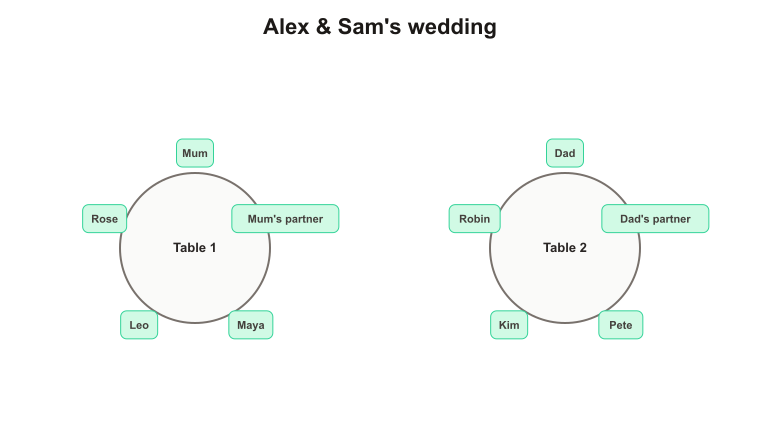
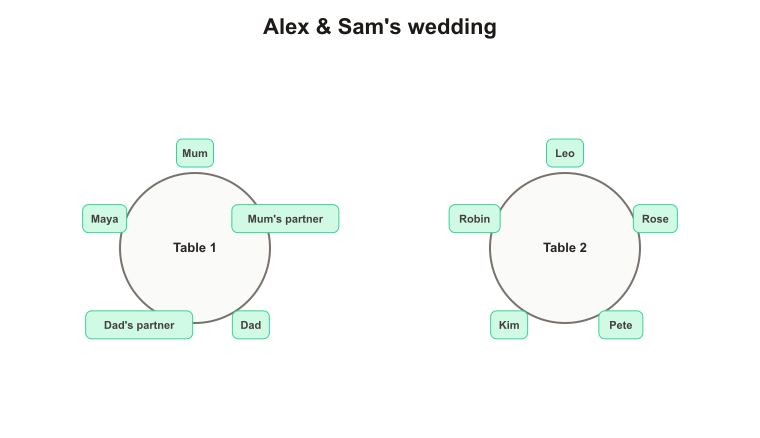
The practical approach that most planners settle on is to give each parent their own table where they host their own side of the family, rather than trying to combine them into one parents' table. What matters just as much is that neither table looks demoted. If one parent is placed beside the head table and the other is three rows back, that difference will be noticed and remembered, whatever you intended by it. When you lay out your tables, keep the two parent tables roughly the same distance from the top table, and try to give them comparable neighbours.
If a new partner is attending, seat them with the parent they came with. Splitting them up to avoid awkwardness usually creates more of it, not less. And if two parents are genuinely not on speaking terms, add them to the keep-apart list rather than relying on yourself to remember at midnight when you are moving name cards around.
How many tables will you need
- A 60-inch round table is normally set for eight, and can take ten if the place settings are tight. Ten is fine for a younger crowd and cramped for a formal dinner.
- Long banquet tables usually take ten to twelve, but people at the far ends effectively only talk to four others, so they suit family groups better than mixed tables.
- Leave one table's worth of slack. Late acceptances, a plus-one you forgot about and a supplier who needs feeding all turn up eventually.
- The capacity counter under the table settings compares your seats against your list size, so you will see a shortfall immediately rather than when you print.
When auto-arrange cannot seat someone
If a guest is left in the unseated area, the planner could not find a complete placement without knowingly breaking a hard rule. Check total capacity, individual table sizes, locked seats and contradictory rules. You can add a table, add a seat, unlock a fixed placement or turn a cautious must-not into a preference.
Printing and place cards
Click Print / Save PDF and choose 'Save as PDF' in your browser's print dialog. The printed sheet drops every button and control and gives you a clean table-by-table list with your event name at the top — the format your venue and caterer will ask for. Print one copy for the venue, one for whoever is directing guests on the day, and keep the PDF on your phone. If you would rather start on paper, there are printable seating chart templates; for classes and workshops use the classroom seating chart maker.
Put the finished plan on your wedding website
Choose Embed plan to add a clean, read-only seating chart to your wedding website or guest-information page. You decide whether guest names appear; planning notes, meal choices, accessibility information and relationship rules stay out of the published copy.
The embed is a snapshot rather than a live link to your working plan. You can continue rearranging privately, then replace the embed code only when you are ready to publish the next version.